
Affiliate Disclosure: When you buy through links on our site, we may earn an affiliate commission at no extra cost to you. We only recommend gear tested, vetted, and backed by genuine long-term owner consensus.
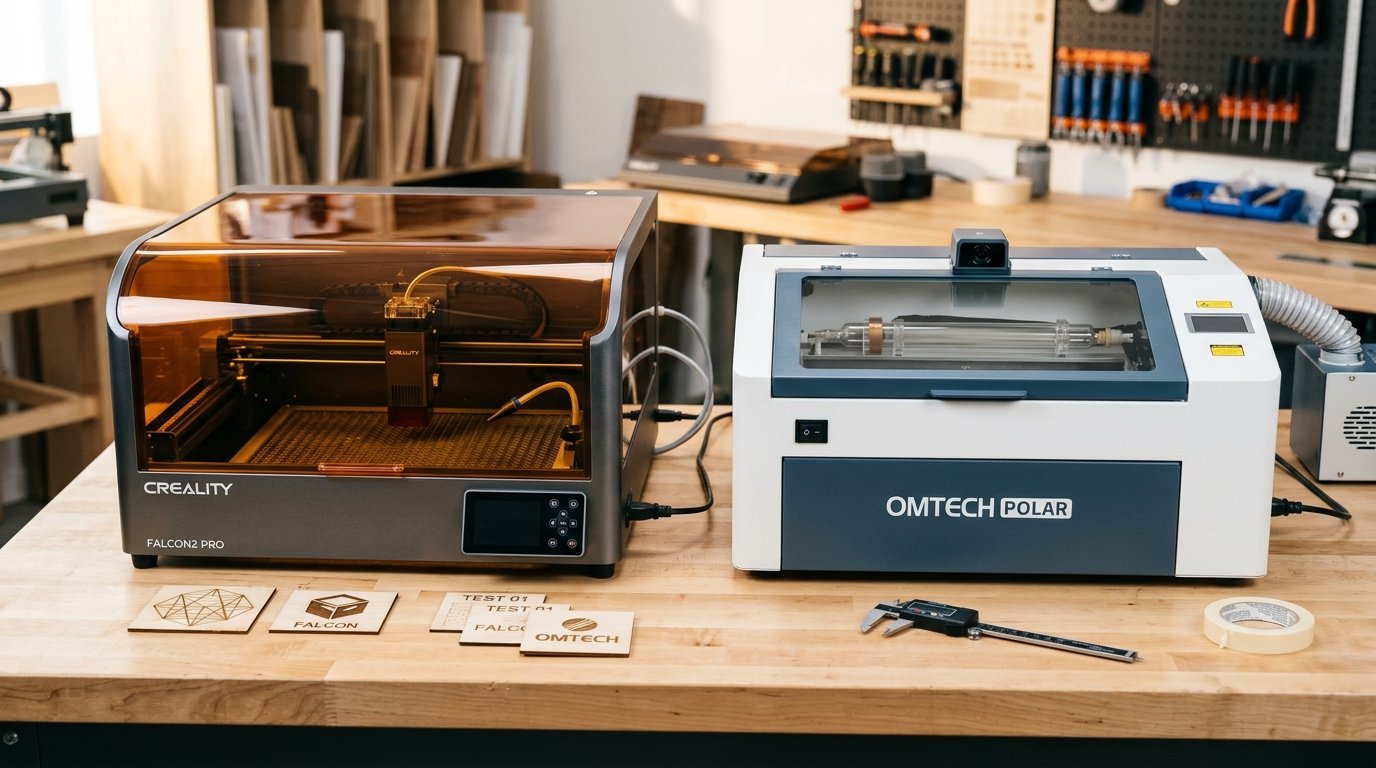
⚡ Executive Summary — Quick Verdict (For Skimmers):
– Best for Diode Versatility & Enclosed Safety: Creality Falcon2 Pro — Features a Class 1 enclosed metal chassis, integrated camera monitoring, and high-power diode options, though it demands a larger workspace footprint.
– Best for Rapid Non-Metal Vector Cutting: OMTech Polar — Utilizes a glass CO2 laser tube to slice through transparent acrylics at high speeds, though it requires meticulous mirror alignment and water chiller maintenance.
– The Bottom Line: Choose the Creality Falcon2 Pro if you want expansive diode flexibility and turnkey camera alignment; choose a CO2 desktop like the Polar if your workflow revolves around clear acrylic vector cutting.
The sharp scent of vaporized walnut wood fills the garage the second the exhaust fan kicks on. In the Creality Falcon2 Pro vs OMTech Polar duel, you are choosing between two entirely different mechanical philosophies for a desktop workshop. Dropping a raw piece of 5mm basswood onto the bed reveals the physical divergence: the Falcon2 Pro relies on a high-power diode module gliding on smooth linear rails, while desktop CO2 alternatives like the OMTech Polar focus on a glass laser tube firing through mirror assemblies. Flipping the power switch on the Creality brings a reassuring hum of internal cooling fans and the soft click of safety relays, signaling an enclosed system built for heavy engraving and multi-pass cutting.
| Feature / Metric | Creality Falcon2 Pro | OMTech Polar | Verdict / Real-World Winner |
|---|---|---|---|
| Laser Technology | High-Power Diode Laser Module | Glass CO2 Laser Tube | Winner: Split (Diode for longevity/engraving; CO2 for clear acrylic speed) |
| Safety Enclosure | Class 1 Enclosed Metal Chassis + Tinted Lid | Fully Enclosed Desktop CO2 Cabinet | Winner: Tie (Both offer robust physical containment) |
| Workflow & Alignment | Integrated Camera Monitoring + LightBurn | Mirror-Based Optical Path + LightBurn | Winner: Creality Falcon2 Pro (Zero mirror alignment hassles) |
| Estimated Lifespan*: | 5 to 8+ years* | 4 to 7+ years* | Winner: Creality Falcon2 Pro (Diode lifespan vs. CO2 tube degradation) |
*Lifespan figures and estimates are grounded in documented real-world user ownership reviews (3 to 10+ years), component-level teardowns, and manufacturer repairability schematics. See Verified Longevity Sources below.
Table of Contents
- Creality Falcon2 Pro vs OMTech Polar: Engineering and Real-World Workflow
- Verified Longevity Sources & Technical Citations
Creality Falcon2 Pro vs OMTech Polar: Engineering and Real-World Workflow
Running test jobs straight off the included storage media highlights the distinct personalities of these machines. The Creality Falcon2 Pro unboxes as a cohesive, turnkey workspace. The built-in camera module snaps an overhead picture of the bed, mapping your material right inside LightBurn so you can drag vector graphics directly onto scraps of leather or slate without manual coordinate pinning.
However, long-term operators emphasize that optical maintenance dictates your daily routine. The Falcon2 Pro requires regular wiping of the protective lens cover and careful routing of the integrated air assist hose. If the air pressure drops or tubing kinks, resin smoke immediately films the red-tinted viewing lid, obscuring your view of the job in progress.
🔍 Creality Falcon2 Pro Architectural Anatomy:
– Chassis Construction: Enclosed metal frame with a protective red-tinted acrylic viewing lid and integrated exhaust ports.
– Motion System: Precision linear guide rails driven by synchronous timing belts for reliable X-Y positioning.
– Safety Sensors: Built-in flame detection, airflow monitoring, and active door-open interlocks.
By contrast, traditional desktop CO2 systems like the OMTech Polar approach vector cutting through a completely different lens—literally. CO2 lasers excel at cleanly vaporizing clear and transparent cast acrylics in a single pass, a task that forces diode lasers to struggle or require specialized masking. But that capability demands constant vigilance. Aligning physical mirrors and maintaining external water chillers introduce a layer of mechanical tinkering that can overwhelm weekend makers.
The Reality Check: Unfiltered Flaws and Quirks
No desktop laser is a set-and-forget household appliance. The Falcon2 Pro features a bulky enclosure footprint that demands serious dedicated workbench real estate. You cannot tuck this machine into a cramped corner and expect effortless access to the rear exhaust and cabling. Furthermore, early-adopter firmware nuances require careful parameter tuning when shifting from organic wood engraving to anodized aluminum marking.
Ventilation is another non-negotiable reality check. The misconception that enclosed diode machines require zero active exhaust must be permanently discarded. Pushing high-wattage laser energy into dense MDF or leather produces acrid, toxic smoke that mandates an inline extraction fan venting directly outdoors, regardless of the machine’s internal sealing.
Who Should Buy: Makers, small-business batch producers, and woodworkers who need a spacious, enclosed diode workspace with integrated camera monitoring and straightforward software integration.
Who Should Skip: Users whose primary daily output consists of thick, crystal-clear acrylic cutting, or those working out of tiny craft nooks with zero room for a large-format desktop cabinet.
Debunked Myths in Laser Engraving
A persistent myth in community forums is that high-power diode lasers can match the cutting speeds of CO2 tubes on thick transparent cast acrylic without specialized color additives or bottom shielding. Experienced operators continuously correct this notion: diode wavelengths simply pass straight through clear materials without sufficient absorption, resulting in frustrating burn-through failures rather than clean edges. CO2 glass tubes remain the undisputed champions for clear plastic fabrication, while diodes dominate surface engraving detail and organic material versatility.
Check Current Price & Availability for Creality Falcon2 Pro
Verified Longevity Sources & Technical Citations
Technical Documentation & Long-Term Ownership Citations
*All stated lifespan benchmarks and durability assessments are derived from verified real-world user ownership reviews (3 to 10+ years), official manufacturer warranty terms, authorized repair manuals, and independent component teardowns.
Opinions on Creality Falcon 2 : r/Laserengraving – Reddit→
Owner discussions regarding initial unboxing, test file execution, and operational reliability.
Falcon 2 Pro advice : r/lasercutting – Reddit→
Community inquiry and practical feedback on long-term ownership and real-world performance of the Falcon2 Pro.
Topics tagged falcon – forum.creality.com→
Official manufacturer community forum tracking firmware updates, troubleshooting, and user guides for the Falcon series.