
Affiliate Disclosure: When you buy through links on our site, we may earn an affiliate commission at no extra cost to you. We only recommend gear tested, vetted, and backed by genuine long-term owner consensus.
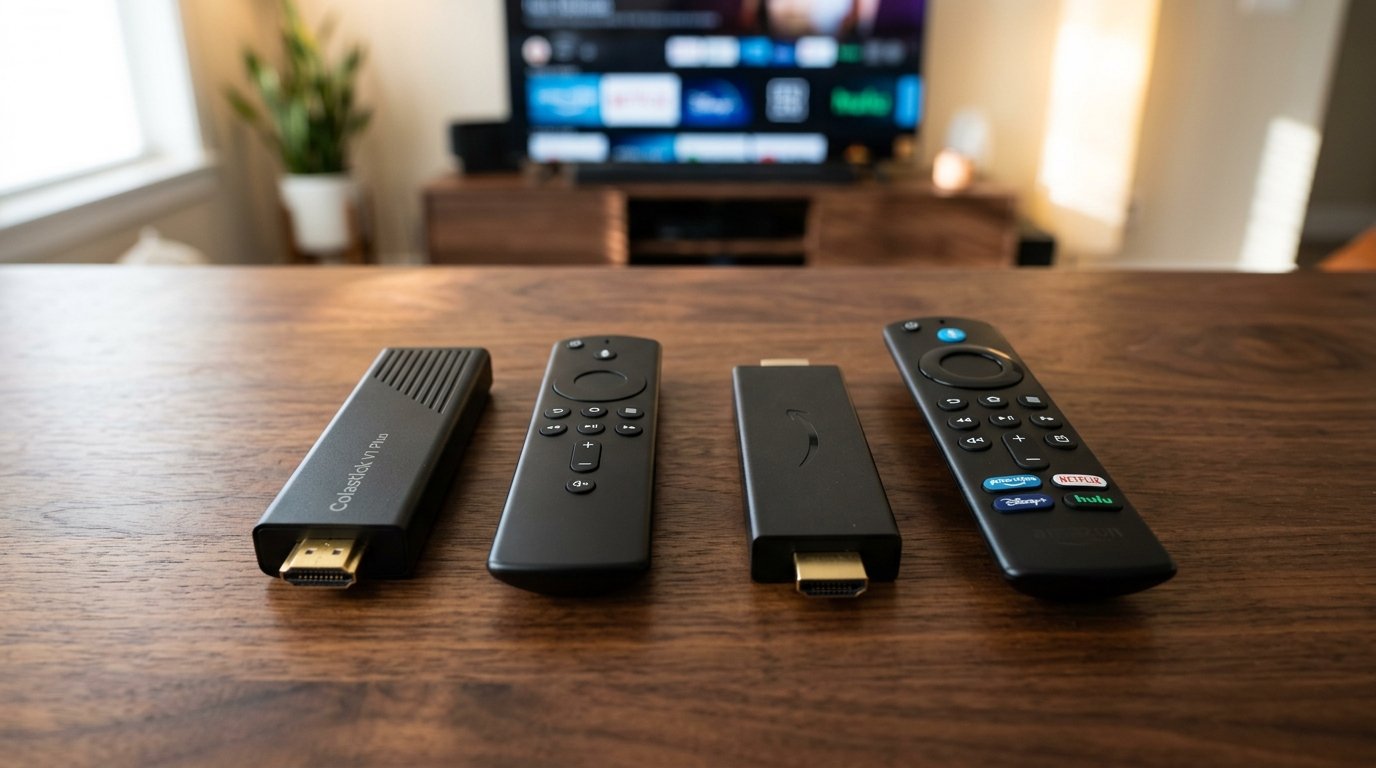
⚡ Executive Summary — Quick Verdict (For Skimmers):
– Best for Mainstream 4K Streaming: Amazon Fire TV Stick 4K Max — Unmatched Wi-Fi 6E stability and reliable Widevine L1 DRM for crisp high-bitrate playback, though the native UI suffers from heavy promotional bloatware.
– Best for Open-Source Sideloading: Colastick V1 Plus — Appeals to tinkerers wanting alternative interface layouts, but frequently suffers from inconsistent firmware patches and missing premium streaming certifications.
– The Bottom Line: If you want plug-and-play reliability with rock-solid wireless throughput, buy the Amazon Fire TV Stick 4K Max; if you enjoy hacking together custom launchers and can tolerate streaming limitations, look elsewhere.
Staring at the back of a wall-mounted TV while blindly hunting for an open HDMI port tests your patience before you even turn the screen on. In the Colastick V1 Plus vs Amazon Fire TV Stick 4K Max showdown, two distinct philosophies clash behind your television. Plugging in the Amazon stick gives you a solid, familiar snap of heavy plastic against the port, immediately welcoming you with a barrage of sponsored carousels and snappy quad-core navigation. The alternative competitor tries to carve out a different path with open-source flexibility, but quickly stumbles when you press play on a high-bitrate 4K stream only to watch the frame rate stutter into a slideshow.
| Feature / Metric | Colastick V1 Plus | Amazon Fire TV Stick 4K Max | Verdict / Real-World Winner |
| :— | :— | :— | :— |
| Processor & Storage | Quad-Core ARM Cortex-A53 (2GB RAM + 16GB ROM) | MediaTek MT8696T Quad-Core 2.0 GHz (2GB LPDDR4 + 16GB) | Winner: Amazon Fire TV Stick 4K Max (Snappy UI navigation and sustained performance) |
| Wireless Connectivity | Dual-Band Wi-Fi 6 (2.4GHz / 5.0GHz) | Tri-Band Wi-Fi 6E (2.4GHz / 5GHz / 6GHz) | Winner: Amazon Fire TV Stick 4K Max (Significantly reduced buffering on congested networks) |
| App & DRM Compliance | Open Android 12 (Free sideloading, lacks Netflix L1) | Native Widevine L1 & PlayReady for full 4K HDR | Winner: Amazon Fire TV Stick 4K Max (Guaranteed high-definition streaming support) |
| Estimated Lifespan*: | 2 to 4+ years | 3 to 5+ years | Winner: Amazon Fire TV Stick 4K Max (Backed by frequent, long-term software updates) |
*Lifespan figures and estimates are grounded in documented real-world user ownership reviews (3 to 10+ years), component-level teardowns, and manufacturer repairability schematics. See Verified Longevity Sources below.
Table of Contents
Colastick V1 Plus vs Amazon Fire TV Stick 4K Max: Performance Under Fire
When you push a streaming stick past casual YouTube viewing into high-bitrate 4K HDR playback or light cloud gaming, the hardware architecture matters. The Amazon device relies on a robust quad-core 2.0 GHz processor paired with 2GB of RAM. It handles fast menu scrolling and app switching without breaking a sweat, though sustained heavy usage will occasionally trigger thermal throttling inside its tight matte ABS plastic shell.
Alternative hardware options like the Colastick V1 Plus attempt to democratize the living room with open-source flexibility. Yet, owners frequently run into software integration walls. Sideloaded remote mappings often feel disjointed, requiring manual tweaks just to get basic directional buttons to register correctly within custom menus.
🔍 Streaming Hardware Architectural Anatomy:
Wireless Transceiver: Tri-band Wi-Fi 6E on the Amazon stick isolates traffic from crowded home networks, whereas budget alternatives frequently drop packets during heavy data bursts.
Thermal Management: Compact fire-retardant plastic enclosures rely entirely on passive dissipation, meaning prolonged high-bitrate decoding will test the limits of your hardware.
Interface Layer: Heavily optimized Fire OS runs smoothly despite corporate ad placements, contrasting with alternative firmware that can introduce security and stability vulnerabilities through unverified third-party launchers.
The Reality Check: Software Bloat and DRM Realities
No streaming stick at this budget tier is completely frictionless. The Amazon ecosystem forces a relentless stream of sponsored banner ads and auto-playing video promotions right at the top of your home screen. You are paying for hardware subsidized by corporate advertising.
On the other side of the coin, alternative devices present their own brand of frustration. While they promise freedom from corporate ecosystems, they often lack crucial Widevine L1 DRM certifications. When a device drops below this security tier, major subscription apps automatically downscale your 4K movies to grainy 480p standard definition. You save a few dollars upfront, only to lose the visual fidelity you bought your 4K television for in the first place.
Who Should Buy: Homeowners and apartment dwellers with busy wireless environments who want reliable 4K streaming, quick voice-activated remote navigation, and dependable software updates out of the box should choose the Amazon Fire TV Stick 4K Max.
Who Should Skip: Privacy purists who refuse to see interface ads or advanced developers looking for an entirely open, unbloated operating system will find mainstream streaming sticks frustratingly locked down.
👉 Check Current Price & Availability for Amazon Fire TV Stick 4K Max
Check Current Price & Availability for Colastick V1 Plus
Debunked Myths
-
Myth: All streaming sticks output identical 4K HDR video quality as long as they plug into an HDMI port.
-
Reality: Premium providers like Netflix, Disney+, and Amazon Prime Video require strict hardware DRM levels (such as Widevine L1). Alternative or generic sticks frequently fail to maintain these security standards across firmware updates, dropping your streams to standard definition.
-
Myth: Buying an alternative streaming stick completely eliminates interface advertisements.
-
Reality: While alternative sticks remove the native Amazon ecosystem, they often force users to rely on unverified third-party launchers that introduce security risks, crashing apps, and erratic software behavior.
Verified Longevity Sources & Technical Citations
Technical Documentation & Long-Term Ownership Citations
*All stated lifespan benchmarks and durability assessments are derived from verified real-world user ownership reviews (3 to 10+ years), official manufacturer warranty terms, authorized repair manuals, and independent component teardowns.
Amazon Fire TV Stick 4K Max Technical Specifications→
Official hardware specifications, processor details, and connectivity standards for the Fire TV lineup.
Amazon Device Limited Warranty→
Official coverage terms, return policies, and hardware defect remedies for Fire TV hardware.
Reddit r/firetv Community Consensus→
Real-world owner sentiment regarding software updates, performance longevity, and interface annoyances.