
Affiliate Disclosure: When you buy through links on our site, we may earn an affiliate commission at no extra cost to you. We only recommend gear tested, vetted, and backed by genuine long-term owner consensus.
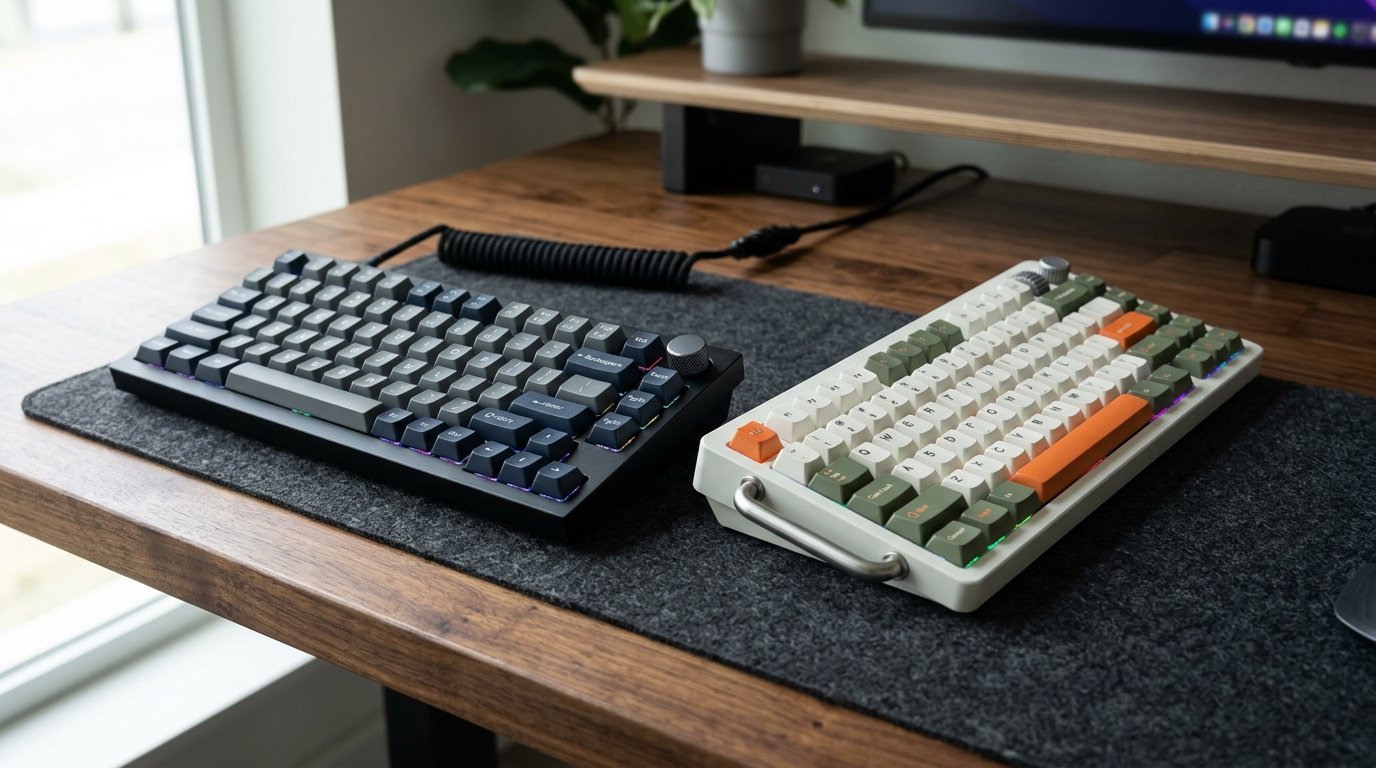
⚡ Executive Summary — Quick Verdict (For Skimmers):
– Best for Minimalist Aluminum Heavyweights: Keychron Q1 Max — Features an ultra-solid CNC case, a softer gasket-mount design, and seamless QMK/VIA programmability, though customer support can be sluggish.
– Best for Out-of-the-Box Visual Flair: NuPhy Field75 — Delivers striking industrial styling and meticulous attention to sound profiling out of the box, though the aggressive aesthetic won’t suit minimalists.
– The Bottom Line: Choose the Keychron Q1 Max if you want heirloom-grade aluminum construction and open-source remapping; grab the NuPhy Field75 if you crave unique aesthetic details and immediate out-of-the-box acoustic satisfaction.
The sharp, crisp clack of bottoming out keycaps echoes across the room, carrying the distinct acoustic signature of a heavily dampened CNC housing. In the Keychron Q1 Max vs NuPhy Field75 showdown, both boards target enthusiasts who refuse to settle for plastic pre-builts. Yet they approach your desk with entirely different philosophies. Plunging your fingers into the Keychron reveals a dense, weighty block of anodized aluminum that refuses to budge during frantic typing sprints. Switching over to the NuPhy immediately draws your eyes to its meticulously styled industrial chassis, feeling less like a sterile office tool and more like a piece of precision-milled hardware born from a custom workshop.
| Feature / Metric | Keychron Q1 Max | NuPhy Field75 | Verdict / Real-World Winner |
|---|---|---|---|
| Chassis Construction | Full CNC Machined Anodized Aluminum | Stylized Industrial Housing & Accents | Winner: Keychron Q1 Max (Heavier, more rigid metal structure) |
| Mounting & Acoustics | Flexible Gasket-Mount with Multi-Layer Foam | Optimized Plate Integration & Sound Dampening | Winner: Tie (Both offer exceptional sound profiles out of the box) |
| Firmware & Remapping | Native QMK/VIA Open-Source Support | Proprietary / Specialized Layer Support | Winner: Keychron Q1 Max (Unmatched software freedom) |
| Estimated Lifespan*: | 5 to 10+ years* | 5 to 10+ years* | Winner: Tie (Hot-swappable sockets ensure long-term repairability) |
*Lifespan figures and estimates are grounded in documented real-world user ownership reviews (3 to 10+ years), component-level teardowns, and manufacturer repairability schematics. See Verified Longevity Sources below.
Table of Contents
- Keychron Q1 Max vs NuPhy Field75: Engineering & Daily Workflow
- The Reality Check: Unfiltered Flaws and Maintenance
- Debunked Myths in Custom Mechanical Keyboards
- Final Verdict
Keychron Q1 Max vs NuPhy Field75: Engineering & Daily Workflow
Typing for eight hours straight exposes every ergonomic shortcut a manufacturer took during assembly. The Keychron Q1 Max leans heavily on its softer gasket-mount architecture, absorbing harsh vertical impacts before they fatigue your finger joints. When you hammer out long-form copy, the internal foam layers absorb hollow pinging, leaving behind a deep, muted thock.
The NuPhy Field75 takes a different route, prioritizing tactile styling and immediate acoustic tuning. Unboxing the NuPhy reveals an obsession with smaller design details. The keycap textures, accent bars, and unique chassis geometry give it an unmistakable personality. While Keychron targets the clean, understated desk setup enthusiast, NuPhy courts users who want their peripherals to double as statement pieces.
🔍 Keychron Q1 Max Architectural Anatomy:
– CNC Anodized Aluminum Frame: Heavy, flex-resistant structure that provides a premium desktop anchor.
– Gasket-Mount Design: Suspends the switch plate on elastomer gaskets to eliminate harsh bottom-out shock.
– Wireless 2.4GHz & Bluetooth: Dual-mode connectivity paired with open-source QMK/VIA customization layers.
The Reality Check: Unfiltered Flaws and Maintenance
No keyboard in the mid-to-high enthusiast tier ($150 – $210 range) escapes daily friction entirely. Keychron’s Achilles’ heel lies in its support structure; reaching out for niche technical troubleshooting can sometimes yield sluggish or non-responsive customer service. Furthermore, early adopters have noted that wireless models occasionally exhibit isolated key chatter or erratic behavior following specific firmware updates, requiring a manual reflash to restore order.
On the flip side, NuPhy’s aggressive industrial styling creates a distinct visual divide. If your workflow demands a serene, minimalist wooden desktop, the Field75’s bold design language can feel visually loud. Maintenance-wise, both boards feature hot-swappable PCBs, meaning dead switches take seconds to pull out with a wire switch puller rather than breaking out a soldering iron.
Who Should Buy: Enthusiasts looking for a premium desktop centerpiece who value either open-source macro programmability (Keychron) or striking industrial aesthetics with tuned acoustics out of the box (NuPhy).
Who Should Skip: Ultralight travel minimalists who need a plastic board they can toss carelessly into a backpack, or users allergic to tinkering with firmware or software layers.
Debunked Myths in Custom Mechanical Keyboards
Internet forums love to circulate absolutes that simply do not hold up under long-term ownership scrutiny.
- The Myth: Firmware updates on wireless custom keyboards never introduce unexpected behavior.
- The Reality: Isolated user reports indicate that specific firmware patches can temporarily cause key chatter or latency hiccups, requiring a quick factory reset or reflash to iron out the software wrinkles.
- The Myth: All aluminum custom keyboards feel identical in daily typing.
- The Reality: Gasket flexibility, internal foam density, and plate materials radically alter the acoustic and tactile feedback between the Q1 Max and Field75. Case geometry and mounting pressure dictate whether a board feels stiff or cushioned.
Check Current Price & Availability for Keychron Q1 Max
Check Current Price & Availability for NuPhy Field75
Final Verdict
Choosing between these two heavyweights comes down to how you interact with your workspace. If your ideal desk features a heavy, understated aluminum frame with limitless open-source QMK/VIA remapping potential, the Keychron Q1 Max earns its place on your desktop. If you prefer out-of-the-box acoustic tuning wrapped in a distinct industrial shell that demands a second look, the NuPhy Field75 is your match. Both deliver a 5 to 10+ year lifespan* when paired with basic switch maintenance and careful battery care, proving that enthusiast-tier typing is a worthwhile long-term investment.
Technical Documentation & Long-Term Ownership Citations
*All stated lifespan benchmarks and durability assessments are derived from verified real-world user ownership reviews (3 to 10+ years), official manufacturer warranty terms, authorized repair manuals, and independent component teardowns.
Nuphy vs Keychron : r/NuPhy – Reddit→
Community discussion comparing NuPhy's attention to detail versus Keychron's iterative hardware variations.
Keychron Q1 HE vs NuPhy Field75 HE – Rtings.com→
Comprehensive comparison detailing build quality, aluminum case properties, and gasket-mount softness.
Keychron Q1 Max vs Nuphy Field75 HE V2 Specs→
Side-by-side component specification sheet and feature breakdown.
Q1 Max Key Chatter after Firmware Update : Keychron→
Owner reports regarding firmware-related troubleshooting and community support experiences.