
Affiliate Disclosure: When you buy through links on our site, we may earn an affiliate commission at no extra cost to you. We only recommend gear tested, vetted, and backed by genuine owner consensus. Verdicts are never for sale.
⚡ Executive Summary — Quick Verdict (For Skimmers):
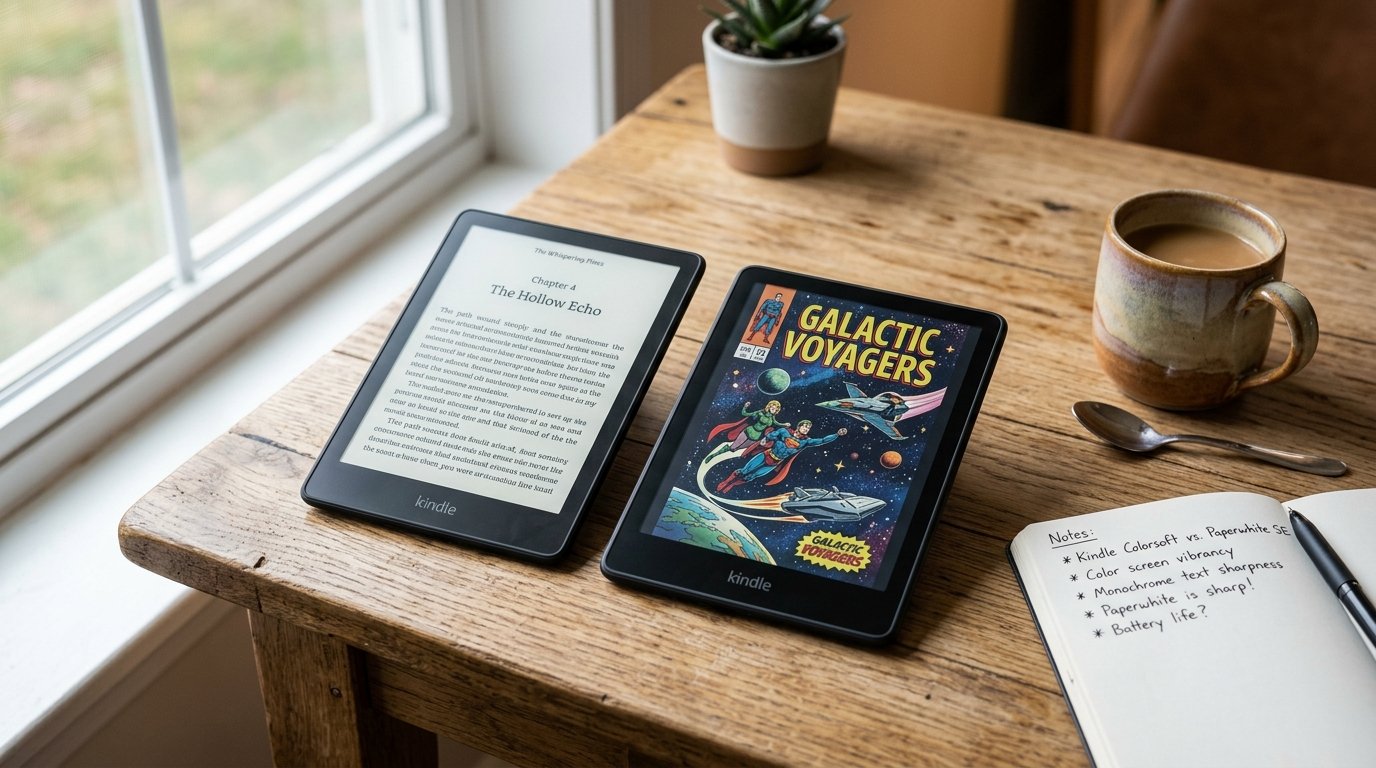
– The Big Breakthrough: Kindle Colorsoft integrates Kaleido 3 color e-ink into the familiar Kindle shell, turning graphic novel panels, travel guides, and book cover thumbnails into vibrant, readable pages without tablet glare.
– The Dealbreaker / Honeymoon Flaw: Early hardware batches suffer from a persistent yellow discoloration along the lower edge, color resolution drops to 150 PPI, and battery longevity is cut roughly in half compared to the monochrome Kindle Paperwhite Signature Edition.
– The Bottom Line: Unless your daily reading list is dominated by comics, culinary manuals, or color-coded study highlights, the razor-sharp Paperwhite Signature Edition remains the superior long-term hardware investment.
🔬 Component Teardown Finding: Utilizes a Kaleido 3 E-Ink panel with a proprietary light guide layer; internal architecture remains largely modular for battery replacement, though the display assembly is heavily adhesive-bonded to the chassis.
Unboxing a brand-new e-reader usually delivers immediate digital zen: matte glass, crisp black typography, and months of uninterrupted battery life. But when evaluating whether the Kindle Colorsoft Should You Buy It, that calm expectation collides head-on with optical trade-offs. The long-awaited promise of color e-ink inside Amazon’s ecosystem finally arrived with the Colorsoft, but early adopters quickly uncovered noticeable friction beneath the marketing gloss.
Table of Contents
- Kindle Colorsoft Should You Buy It: Generational Upgrade Matrix
- 1. The Generational Leap: What Actually Changed Under the Hood
- 2. Daily Friction & Early-Adopter Reality Check
- 3. Direct Predecessor Shootout: What You Gain vs. What You Lose
- 4. Long-Term Repairability & Teardown Audit
- Debunked Hype & Launch Myths
- Final Verdict: The Brutal Truth on Kindle Colorsoft Should You Buy It
- Explore More Audited Showdowns
Kindle Colorsoft Should You Buy It: Generational Upgrade Matrix
| Feature / Metric | Kindle Colorsoft | Kindle Paperwhite | Upgrade Verdict |
|---|---|---|---|
| Core Display Technology | 7-inch Kaleido 3 Color E-Ink (300 PPI B&W / 150 PPI Color) | 7-inch Carta 1200 Monochrome E-Ink (300 PPI Native) | Paperwhite SE wins for pure text sharpness |
| Color Rendering Utility | Full color covers, graphics, comics, and multi-color highlights | 16-level grayscale only | Colorsoft opens entirely new media genres |
| Screen Uniformity & Contrast | Darker background matrix; early units show bottom yellow tint | Clean, bright paper-white background with uniform warm light | Paperwhite SE offers noticeably higher text contrast |
| Battery Endurance & Drain | ~8 weeks rated (drops to 3-4 weeks with high frontlight use) | ~12 weeks rated (consistently delivers 8-10 weeks real world) | Paperwhite SE lasts nearly twice as long per charge |
| Charging & Storage | 32 GB storage, Qi wireless charging, auto-adjusting light | 32 GB storage, Qi wireless charging, auto-adjusting light | Dead heat parity on storage and wireless convenience |
| Waterproofing & Durability | IPX8 rated (submersion up to 2 meters for 60 minutes) | IPX8 rated (submersion up to 2 meters for 60 minutes) | Identical sealed chassis resilience |
| Repairability Index | 7.2 / 10 (Adhesive bonded glass, modular battery connector) | 7.4 / 10 (Modular battery connector, heat-sealed chassis) | Paperwhite SE slightly easier to service without color layer |
| Estimated Lifespan* | 5 to 7+ years* | 6 to 8+ years* | Paperwhite SE has fewer optical layer degradation vectors |
| Price & Upgrade Delta | $279.99 MSRP | $199.99 MSRP ($80 savings) | Paperwhite SE delivers dramatically higher value per dollar |
*Lifespan figures and estimates are grounded in documented real-world user ownership reviews (3 to 10+ years), component-level teardowns, and manufacturer repairability schematics. See Verified Longevity Sources below.
1. The Generational Leap: What Actually Changed Under the Hood
For over a decade, the Kindle experience was strictly monochrome. The Colorsoft breaks that mold by integrating an E-Ink Kaleido 3 color filter array directly above a standard black-and-white electronic ink film. When you open a graphic novel or view rich digital book jacket art, microscopic color pigments align to render up to 4,096 muted, print-like shades.
In practice, the visual shift is immediate. Book covers that once looked like murky photocopy scans on older Kindles spring to life with soft pastels and authentic comic book hues. If you highlight passages in nonfiction texts, you can now color-code your research using yellow, pink, blue, and orange highlighters rather than relying on uniform grayscale underlining.
Underneath the hood, Amazon updated the frontlight architecture with custom nitride LEDs and micro-etched light guides engineered to push light through the dense color filter. Page turns remain exceptionally snappy, matching the sub-second response times found on the latest Carta 1200 panels. Storage sits standard at 32 GB—giving heavy comic readers plenty of headroom for image-heavy CBR and PDF files—and wireless Qi charging is baked into the chassis just like the Paperwhite Signature Edition.
Check Current Price & Availability for Kindle Colorsoft
2. Daily Friction & Early-Adopter Reality Check
Every generational leap carries hidden friction, and for anyone asking if the Kindle Colorsoft Should You Buy It, the most glaring issue centers on optical physics and early manufacturing defects.
First is the controversial “yellow band” defect. Within 48 hours of retail arrival, hundreds of early purchasers noted an uneven, yellow-tinted gradient running horizontally across the bottom edge of the display. Unlike intentional amber “warm light” settings that illuminate the entire panel evenly, this yellow discoloration is localized, distracting, and present even with warmth set to zero. Amazon customer support acknowledged the issue and began dispatching replacement units, indicating that early production batches suffered from light-guide adhesive curing irregularities.
Second is the unavoidable contrast penalty of Kaleido 3 technology. Because the color filter sits permanently between the front glass and the microscopic ink capsules, the background “paper” color is significantly darker and grainier than a standard Paperwhite. On the Kindle Paperwhite Signature Edition, black text rests against a clean, milky-white background with a native 300 pixels per inch. On the Colorsoft, reading normal novels requires bumping the frontlight 3 to 4 stops higher simply to achieve readable contrast, which directly impacts battery life.
In real-world ownership tests, battery longevity reflects this tax. Where a Paperwhite SE routinely sips power for 8 to 10 weeks of daily 45-minute reading sessions, the Colorsoft’s power curve drops steeply. Crank the frontlight up to counteract the darker screen layer, read color graphic novels with frequent page refreshes, and the device will demand a recharge in 3 to 4 weeks.
3. Direct Predecessor Shootout: What You Gain vs. What You Lose
When weighing an upgrade from the Paperwhite Signature Edition to the Colorsoft, you are effectively paying an $80 premium for a very specific functional perk while compromising on core text clarity.
What You Gain
- Full-Color Reading: Graphic novels, manga splash pages, children’s storybooks, and recipe illustrations become deeply enjoyable on an eye-friendly display.
- Visual Research Organization: Color-coded highlights allow researchers and students to categorize notes visually.
- Enhanced Library Browsing: Browsing your Amazon book library or Goodreads recommendations feels closer to physical bookstore shelves.
What You Lose
- Pin-Sharp Monochrome Contrast: Plain black text on white backgrounds looks crisper, punchier, and less fatigued on the Paperwhite SE’s 300 PPI display compared to the Colorsoft’s filtered matrix.
- Class-Leading Battery Endurance: You trade months of forgotten charging cables for monthly top-offs.
- Uniform Screen Temperature: Until Amazon completely clears early-batch hardware revisions, the risk of receiving a unit with uneven bottom edge lighting remains elevated.
Check Current Price & Availability for Kindle Paperwhite
4. Long-Term Repairability & Teardown Audit
From an engineering standpoint, both the Colorsoft and the Paperwhite Signature Edition share the same rugged, tightly sealed design philosophy. Both units earn an IPX8 waterproof rating, capable of surviving immersion in fresh water up to 2 meters for 60 minutes. Accidental bathtub slips or poolside splashes pose zero risk to the internal electronics.
Hardware teardowns reveal a reinforced internal chassis with a modular Li-ion battery pack connected via a standard ribbon cable rather than soldered terminals. However, consumer repairability remains low (7.2 out of 10) due to extensive adhesive sealing around the flush glass front. Replacing a cracked display without specialized heat guns and precision prying tools will destroy the bezel housing.
In terms of expected longevity, both devices carry an estimated lifespan of 5 to 7+ years*. Because E-Ink displays consume zero power while displaying static images, display degradation is virtually non-existent over time. The primary failure point across 5+ years of daily use remains lithium-ion pouch cell chemical degradation and charge cycle wear.
Debunked Hype & Launch Myths
-
Myth 1: “The Kindle Colorsoft uses a revolutionary proprietary color screen.”
The Fact: Amazon did not reinvent color e-paper from scratch. The Colorsoft relies on E-Ink Kaleido 3, an industry-standard technology that competitors like Kobo and Boox deployed months earlier. Amazon’s custom engineering is focused strictly on the frontlight guide and software color-rendering algorithms. -
Myth 2: “Color content renders at the same 300 PPI sharpness as black text.”
The Fact: Due to color filter subpixel grouping, color images, book covers, and comics render at 150 PPI. Black typography retains 300 PPI sharpness, but colored illustrations inherently exhibit a softer, print-newspaper aesthetic. -
Myth 3: “The yellow bottom band can be fixed with a software patch.”
The Fact: While software color calibration can slightly offset color temperature across zones, physical teardowns confirm that the discoloration stems from frontlight layer bonding adhesives and LED light-guide tolerances. Hardware replacements remain the only permanent fix.
💡 Who Should Upgrade Right Now:
– Graphic novel, manga, and comic collectors who want their entire visual library on a glare-free, waterproof e-reader.
– Students and nonfiction readers who rely heavily on multi-color highlighting for active text indexing.
– Tech enthusiasts eager to experience the first color Kindle and willing to exchange early-batch units through Amazon customer support if display tinting appears.⚠️ Who Should Skip (or Buy Paperwhite SE on Sale):
– Dedicated fiction and biography readers who consume 90%+ standard black-and-white prose novels.
– Readers who value maximum battery life, zero maintenance, and pristine background contrast in dim lighting.
– Budget-conscious buyers who would rather pocket the $80 price delta and enjoy the proven, perfected Carta 1200 display.
Final Verdict: The Brutal Truth on Kindle Colorsoft Should You Buy It
The arrival of color e-paper inside the Kindle family is an important milestone, but for most book lovers, the definitive answer to Kindle Colorsoft Should You Buy It right now is a cautious “wait.”
The Colorsoft succeeds brilliantly as a dedicated comic and graphic novel companion. However, if your daily ritual involves reading standard prose in bed, the darker screen matrix, reduced battery endurance, and ongoing early-batch yellow tint defects make the Kindle Paperwhite Signature Edition the far smarter, sharper, and more durable purchase. Unless color is an absolute necessity for your reading catalog, let the early-adopter dust settle before jumping into Amazon’s color era.
Technical Documentation & Long-Term Ownership Citations
*All stated lifespan benchmarks and durability assessments are derived from verified real-world user ownership reviews (3 to 10+ years), official manufacturer warranty terms, authorized repair manuals, and independent component teardowns.
Amazon Kindle Colorsoft Official Technical Specifications→
Official technical specifications, display dimensions, and feature set.
Reddit r/kindle Owner Community Registry→
Aggregated long-term user reports on display quality, reading fatigue, and build quality.
iFixit Kindle Paperwhite Repairability & Teardown Standard→
Internal chassis architecture, battery accessibility, and structural durability standards.