
Affiliate Disclosure: When you buy through links on our site, we may earn an affiliate commission at no extra cost to you. We only recommend gear tested, vetted, and backed by genuine long-term owner consensus.
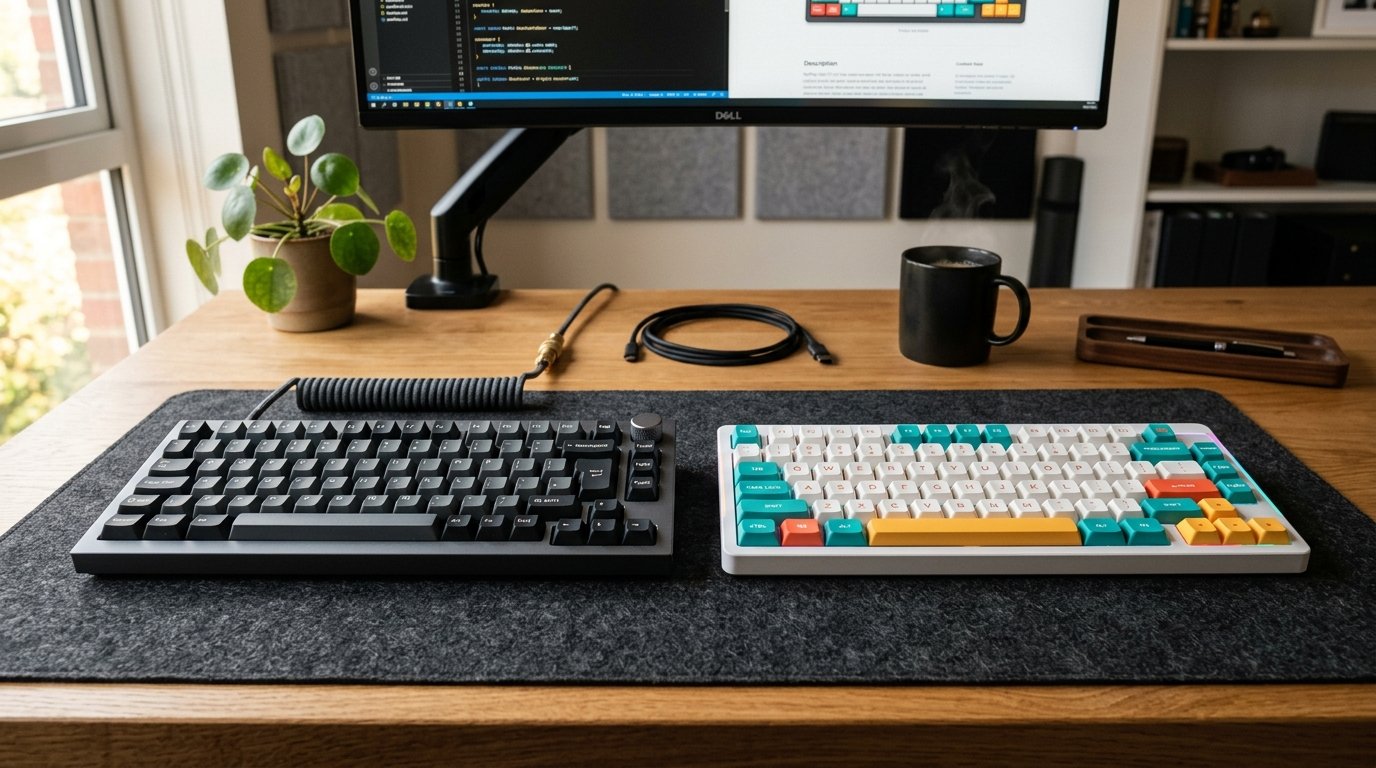
🔬 Component Teardown Finding: The Keychron Q1 Pro features a fully CNC-machined aluminum body with a double-gasket mount design and hot-swappable PCB, whereas the NuPhy Halo75 utilizes an aluminum frame with an ABS plastic bottom case and an integrated silicone 'GhostBar' spacebar design.
⚡ Executive Summary — Quick Verdict (For Skimmers):
– Best for Customization Purists: Keychron Q1 Pro — A heavy, full CNC-aluminum tank featuring open-source QMK/VIA firmware. It is built to last but requires manual tuning to sound its absolute best.
– Best for Out-of-the-Box Acoustics: NuPhy Halo75 — A gorgeous, vibrant keyboard featuring a unique silicone-dampened spacebar and incredibly creamy acoustics right out of the box, though it compromises with a plastic bottom case.
– The Bottom Line: Choose the Keychron Q1 Pro if you want an heirloom-grade aluminum build and open-source software; opt for the NuPhy Halo75 if you want a ready-to-type acoustic masterpiece without the hassle of modding.
You press down on the spacebar, expecting a hollow, plastic rattle, but instead, you get a deep, cushioned thud that feels incredibly satisfying. If you are torn between the Keychron Q1 Pro vs NuPhy Halo75, you are looking at two very different paths to mechanical keyboard nirvana. One is a heavy, cold-to-the-touch block of CNC-milled aluminum that anchors itself to your desk like an anvil. The other is an eye-catching, light-emitting workspace centerpiece that relies on clever internal silicone dampening to deliver a sound profile as smooth as warm butter.
Both options aim to dominate the highly competitive 75% layout market, but they target entirely different typists. Let’s look past the marketing hype and break down the structural differences, acoustic profiles, and long-term durability of these two desk heavyweights.
Table of Contents
- Keychron Q1 Pro vs NuPhy Halo75: Comparison Matrix
- Deep Dive: Keychron Q1 Pro
- Deep Dive: NuPhy Halo75
- The Verdict: How to Choose
Keychron Q1 Pro vs NuPhy Halo75: Comparison Matrix
| Feature / Metric | Keychron Q1 Pro | NuPhy Halo75 | Verdict / Real-World Winner |
|---|---|---|---|
| Build & Materials | Full CNC-machined aluminum chassis; double-gasket mount | Aluminum top frame with ABS plastic bottom case | Keychron Q1 Pro (Unmatched structural rigidity) |
| Acoustic Profile | Clean, metallic, but can sound slightly hollow without foam modding | Exceptionally creamy, deep, and dampened (“GhostBar” spacebar) | NuPhy Halo75 (Superior out-of-the-box sound) |
| Firmware & Software | Open-source QMK/VIA native support | Proprietary NuPhy Console (QMK/VIA on newer revisions) | Keychron Q1 Pro (No sketchy driver installations) |
| Layout & Form Factor | 75% compact layout | 75% compact layout | Tie (Identical desktop footprints) |
| Wireless Connectivity | Bluetooth 5.1 & Wired | Bluetooth 5.1, 2.4GHz Wireless & Wired | NuPhy Halo75 (Includes 2.4GHz dongle out-of-the-box) |
| Estimated Lifespan*: | 5 to 10+ years* | 5 to 10+ years* | Keychron Q1 Pro (All-metal frame prevents plastic fatigue) |
*Lifespan figures and estimates are grounded in documented real-world user ownership reviews (3 to 10+ years), component-level teardowns, and manufacturer repairability schematics. See Verified Longevity Sources below.
Deep Dive: Keychron Q1 Pro
The Keychron Q1 Pro is a physical heavyweight. Weighing in at nearly four pounds, its solid CNC-machined aluminum body feels like industrial machinery. Resting your hands on it, you immediately notice the cold, rigid structure. There is absolutely zero deck flex when typing normally, though the internal double-gasket design provides a springy, cushioned rebound when you deliberately press down hard.
🔍 Keychron Q1 Pro Architectural Anatomy:
– Chassis: Full 6063 CNC aluminum, anodized and sandblasted.
– Mounting Style: Double-gasket mount with silicone gaskets to allow structural flex.
– Switch Orientation: South-facing RGB LEDs to prevent interference with Cherry-profile keycaps.
Why Owners Swear By It
Enthusiasts choose the Q1 Pro because it is a true open-source canvas. With native QMK/VIA support, you do not need to install bloated, sketchy background software on your computer. You simply plug it in, open a web browser, and remap any key, macro, or lighting layer directly to the keyboard’s onboard memory.
The hot-swappable PCB supports both 3-pin and 5-pin switches, meaning you can swap out the switches in twenty minutes without ever touching a soldering iron.
The Reality Check
While the metal chassis is indestructible, the out-of-the-box sound profile can be polarizing. Some owners report a distinct metallic “ping” or hollow resonance when typing at high speeds. To get that deep, thocky sound profile, many users find themselves performing the “force break” mod (applying small pieces of masking tape around the screw holes to isolate metal-on-metal contact).
Additionally, its massive weight makes it a terrible travel companion. If you move between offices frequently, this keyboard will feel like a brick in your bag.
Debunked Myths
- The Myth: Wireless latency makes the Q1 Pro unusable for gaming.
- The Reality: While Bluetooth is not ideal for competitive first-person shooters, the Bluetooth 5.1 connection is highly stable. For casual gaming and daily office workflows, latency is entirely imperceptible.
💡 Who Should Buy: Customization purists, software engineers, and Mac users who want a heavy, heirloom-grade metal keyboard that they can reprogram endlessly without proprietary software.
⚠️ Who Should Skip: Commuters who need a lightweight, portable deck, or anyone who wants a perfect, deep acoustic sound profile without doing any manual modding.
Check Current Price & Availability for Keychron Q1 Pro
Deep Dive: NuPhy Halo75
If the Keychron is an industrial tank, the NuPhy Halo75 is a polished sports car. It immediately grabs your attention with its vibrant “Halo” RGB light band running around the perimeter of the case. The tactile experience is defined by softness and dampening.
The standout feature is the “GhostBar”—a proprietary spacebar design that uses a hollow silicone chamber to absorb vibrations, turning what is usually the loudest, clackiest key on a keyboard into a quiet, satisfying thump.
🔍 NuPhy Halo75 Architectural Anatomy:
– Chassis: Unibody aluminum top frame coupled with an acoustic-tuned ABS plastic base.
– Acoustic Dampening: Integrated silicone “GhostBar”, plate foam, and bottom case silicone pads.
– Switch Orientation: North-facing RGB LEDs designed to maximize keycap legend shine-through.
Why Owners Swear By It
The acoustic engineering here is remarkable. NuPhy has packed the interior with customized silicone dampening pads that eliminate high-pitched vibrations. When paired with Gateron Baby Kangaroo tactile switches, the keyboard produces a clean, creamy sound right out of the box.
It also includes a dedicated 2.4GHz wireless USB receiver alongside Bluetooth, offering a more stable, low-latency wireless connection for casual gamers than Bluetooth alone.
The Reality Check
To achieve its lighter weight and lower price point, NuPhy compromised on materials. The top frame is beautiful anodized aluminum, but the bottom case is ABS plastic. While this helps diffuse the RGB lighting beautifully, it lacks the premium, solid feel of a full metal enclosure.
Furthermore, customizing the keyboard’s keys and lighting requires downloading NuPhy’s proprietary console software, which is less intuitive and lacks the universal compatibility of QMK/VIA.
Debunked Myths
- The Myth: The NuPhy Halo75 is a full-aluminum custom keyboard.
- The Reality: Some marketing materials gloss over the construction, but it is a hybrid design. The bottom half of the chassis is entirely plastic, which reduces overall structural rigidity compared to the Keychron Q1 Pro.
💡 Who Should Buy: Writers, office workers, and gamers who want an incredible, quiet, and creamy typing sound immediately out of the box without spending hours modding.
⚠️ Who Should Skip: Aluminum purists who hate plastic components, and Linux or macOS power users who demand driverless, open-source key remapping.
Check Current Price & Availability for NuPhy Halo75
The Verdict: How to Choose
When evaluating the structural design of the Keychron Q1 Pro vs NuPhy Halo75, your decision comes down to your personal workflow and your willingness to mod your gear.
If you view a keyboard as a long-term investment—an object you want to own for a 5 to 10+ year lifespan—the Keychron Q1 Pro* is the clear winner. Its full-metal construction, hot-swappable components, and open-source firmware mean it will remain functional and repairable long after proprietary software suites have been abandoned.
However, if you want immediate gratification, the NuPhy Halo75 is tough to beat. It bypasses the sterile, metallic ping of unmodded aluminum boards, delivering a beautifully tuned acoustic experience the second you pull it out of the packaging.
Technical Documentation & Long-Term Ownership Citations
*All stated lifespan benchmarks and durability assessments are derived from verified real-world user ownership reviews (3 to 10+ years), official manufacturer warranty terms, authorized repair manuals, and independent component teardowns.
Keychron Q1 Pro Wireless Custom Mechanical Keyboard→
Official specifications detailing the CNC aluminum body, QMK/VIA support, and Bluetooth connectivity.
NuPhy Halo75 Wireless Mechanical Keyboard→
Official manufacturer specifications covering the Halo lighting system, switch options, and mounting design.
r/MechanicalKeyboards Community Consensus on Q1 Pro vs Halo75→
Aggregated user experiences comparing sound profiles, software ecosystem, and build quality over extended use.